
Light control
Light control lets Velpr switch the lights on and off automatically based on the bookings at the facility — court lights that come on just before the slot starts and go off when it is over, without anyone having to remember. The same setup gives you a manual switch for testing and events, and seasonal control for outdoor facilities that need no lights in summer.
Turn the feature on under Admin → Site → Modules by enabling Light control. Light control then appears in the admin menu.
How it fits together
Section titled “How it fits together”The model has three things: controller, zone and rental unit.
| Concept | What it is |
|---|---|
| Controller | The physical relay device that actually switches the power to the lights — in practice a Shelly device. One controller has a number of channels. |
| Zone | One lighting circuit — one channel on a controller — together with the rental units whose bookings should light it. The timing and overrides live here. |
| Rental unit | The court/room the customer books. It is the bookings on the rental unit that drive the lights in the zones it is linked to. |
The link runs from zone → rental units: a zone points at the units that should light it. The relationship is many-to-many — one contactor often lights two courts, and a court may need both its own court lights and a shared corridor circuit. The rule is simple: a zone is on if at least one of the linked rental units has an active booking.
Who does what — hardware vs. configuration
Section titled “Who does what — hardware vs. configuration”Responsibility is split:
- The facility owner provides the hardware and the installation: the Shelly itself, an electrician to wire it to the lighting circuits, and power/network to the device.
- Velpr handles the configuration: which bookings control which channels, when the lights should come on and go off, and the schedule the device runs.
The device fetches its schedule from Velpr at regular intervals (around once a minute) and runs the next 48 hours from its own memory. Velpr never calls out to the device. That means the lights keep switching correctly even if the internet, the power to the server or Velpr should go down for a while.
Setting up from scratch
Section titled “Setting up from scratch”- Turn on Light control under Admin → Site → Modules, and open Light control.
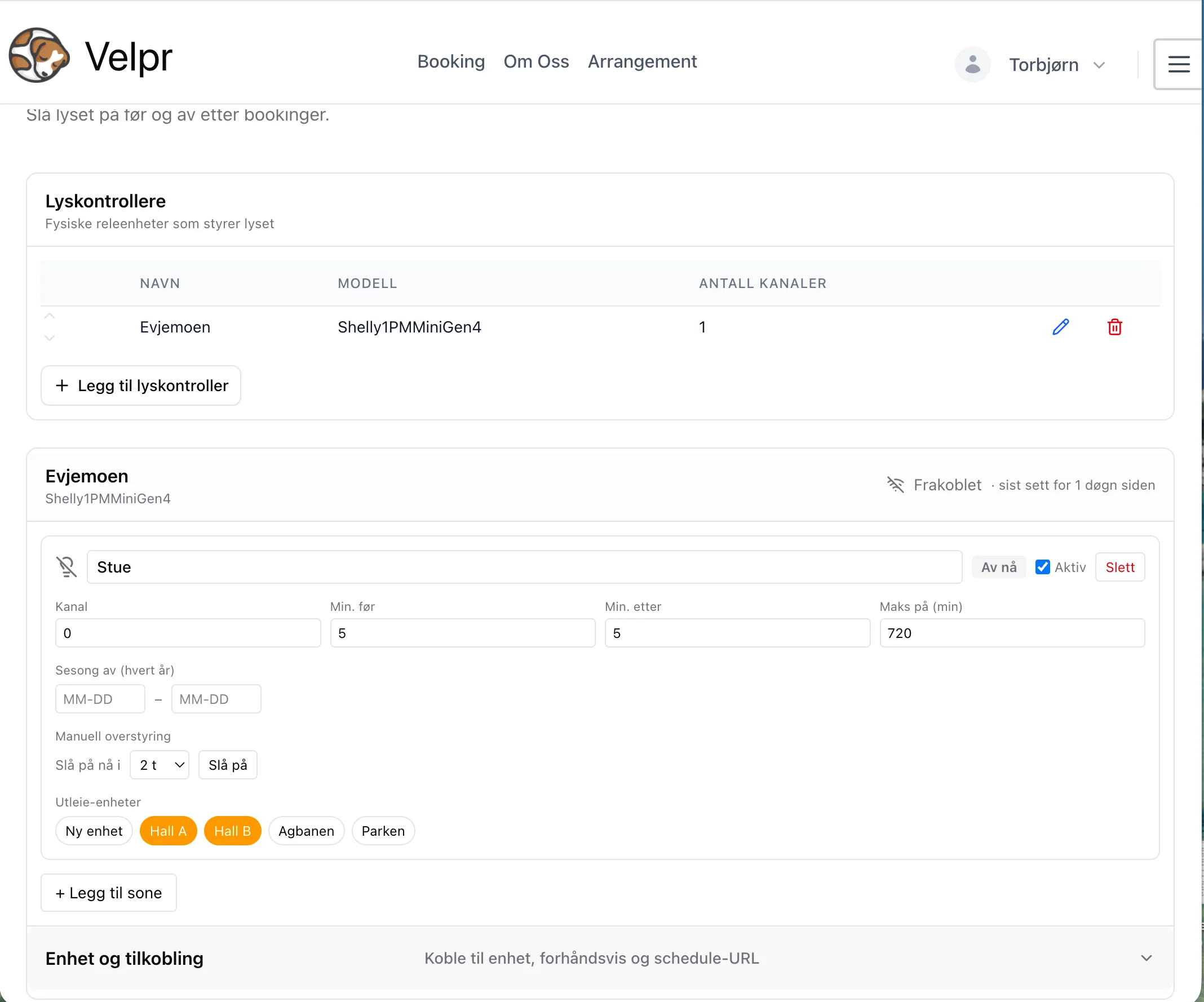
- Under Light controllers, add one controller per physical Shelly device. Give it a Name (e.g. “Shelly Evjemoen”), and check Model and Number of channels — the default is ShellyPro3 with 3 channels. The model is for information only.
- For each controller you get a separate box further down. Add one zone per
lighting circuit you want to control, and fill in:
- Channel — the relay index on the controller (0, 1, 2 …)
- Min. before / Min. after — how many minutes the lights should come on before the slot starts and stay on after it ends
- Max on (min) — a safety limit against the lights staying on far too long because of a data error. Explained under Maximum on-time.
- Active — an off switch for the whole zone
- Tick which rental units should light the zone (the buttons at the bottom of the zone card).
- Save at the bottom of the page.
- Open Device and connection on the controller, press Create new key / script, and paste the script into the Shelly. See Installing a Shelly controller.
Lighting before and after (min. before / min. after)
Section titled “Lighting before and after (min. before / min. after)”Back-to-back bookings on the same court are merged into one continuous lighting window, so the lights do not flicker off and on between slots. Min. after on one slot and Min. before on the next count here: if the gap between two slots is smaller than their sum, the lights stay on across it.
Velpr calculates the times in the facility’s time zone, so the lights switch at the right time wherever the device is. The times on the admin page are shown in your own browser’s time zone.
Only confirmed bookings turn the lights on. A slot that is in a cart or is being paid for does not, and neither do events. Fixed times that are shown as booked do.
Maximum on-time
Section titled “Maximum on-time”Max on (min) is an upper limit for how long the lights in a zone can stay on continuously. Think of it as a fuse, not a timer: it is there to stop a data error — an odd booking, or one that by accident stretches over days — from leaving the lights on almost indefinitely. In normal operation it should never be noticed.
This is how it works: Velpr first merges bookings that sit next to each other into one continuous window, and then checks the window against the limit. If the window is longer than Max on, it is cut down to the limit — the lights go off after that many minutes, even if the booking lasts longer. It is cut at the end (the window is not split up), because “off” is the safe direction to fail in.
- The limit applies to the merged window: many slots in a row become one long period, and it is the total that is measured — not each individual slot.
- 0 = no limit.
- The default is 16 hours (960 minutes).
- Manual override is exempt — “Turn on now for 24 h” is fully respected even if Max on is lower. The limit only applies to booking-driven lights.
So set it well above your longest realistic continuous lighting period — think of a whole tournament day. If it is set too low, you risk the end of a real, long session going dark while the court is still in use.
Status and control
Section titled “Status and control”Each zone card shows the state right now, and each controller shows whether the device is alive.
Current status
Section titled “Current status”- The light bulb icon and the ON now / Off now badge show whether the zone should, according to the plan, be lit at this moment. This is the planned state — what Velpr has told the device — calculated from the same windows the device fetches itself.
- At the top of each controller it says Connected / Disconnected and last seen. This is based on when the device last fetched the schedule; if it has not reported in for a while, it is shown as disconnected.
Manual override
Section titled “Manual override”Under Manual override you can force a zone on now for a chosen number of hours — useful for testing the automation, or for lighting up the hall a whole day during an event that is not in Velpr. Choose the number of hours and press Turn on. The zone then shows Manually on until a time, with a Cancel button.
- The override takes effect right away and applies until it expires (the device picks it up at its next fetch, within about a minute).
- It can be set for up to 24 hours. If you need to control the lights over longer periods, use seasonal control instead.
- A manual on beats both seasonal control and bookings.
Seasonal control
Section titled “Seasonal control”Under Season off (every year) you enter a from date and a to date in the
format MM-DD (month-day). During this period — every year — booking-driven
lights are switched off for the zone. Typical use is outdoor courts that need no
lights in summer, e.g. 05-01 to 08-31.
The period can span New Year: 11-01 to 02-28 means “off through the winter”.
Press Remove to take the seasonal control away. A manual override still
overrides the season, so you can turn the lights on for a single event in the
middle of the “off” period.
Order when several rules apply
Section titled “Order when several rules apply”When several things pull on the same zone, this order of priority applies:
- Disabled (Active off) — hard off, regardless of everything else, including manual override.
- Manually on — beats season, bookings and Max on.
- Max on — cuts booking-driven windows that get too long.
- Season off — switches off booking-driven lights during the period.
- Bookings — the normal automation.
Preview
Section titled “Preview”Scheduled lighting for the next 48 h (under Device and connection, updated every minute) shows exactly the lighting windows Velpr would send to the device for each zone, with start and end times. It is the easiest way to confirm that the setup does what you think before any physical light is connected — and afterwards, that bookings and overrides take effect as they should.
Which controllers are supported
Section titled “Which controllers are supported”Velpr aims to integrate with all relay controllers that are relevant for light control.
Shelly PRO
Section titled “Shelly PRO”The first controller make supported is Shelly, Gen2 and newer devices https://www.shelly.com/. Velpr recommends the Pro series (Shelly Pro 1, Shelly Pro 2 or Shelly Pro 3), which has better current capacity and is more robust. In Norway, Shelly is sold by Elektroimportøren, among others.