
Access
The fields are listed section by section on Access. This page explains what they do.
Which code applies
Section titled “Which code applies”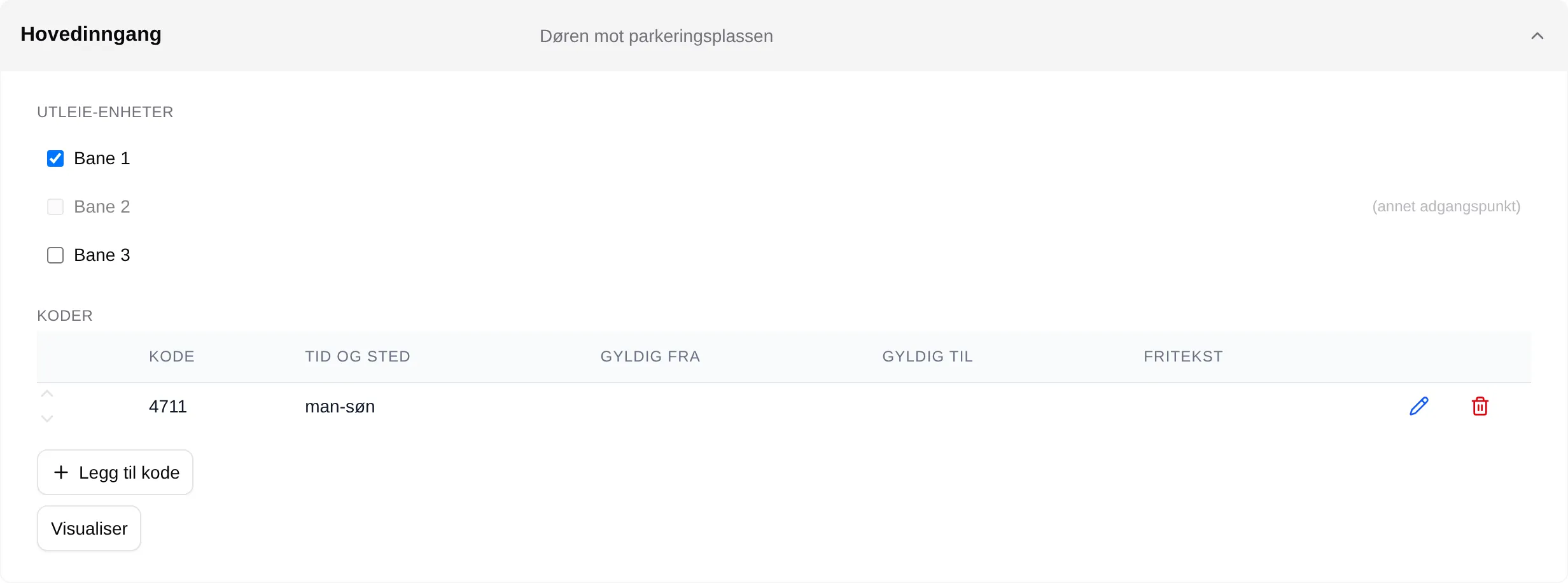
For each booked slot, Velpr looks for a code:
- If the rental unit is linked to a Velpr (kode-utsending) access point, the access point’s codes are used.
- If it is not linked to any access point, Codes without an access point are used.
- The codes are checked in the order of the list. The first one that matches Valid from / to and Time and place applies.
For codes under an access point, Time and place is read against the whole
day: man means all of Monday, man-fre@08-16 Monday to Friday from 08 to 16.
A rental unit that is linked to an access point — of any type — never uses Codes without an access point.
The code is shared: everyone with a slot matching the same code gets the same code.
When the code is shown and sent
Section titled “When the code is shown and sent”| Send relative to | The code becomes visible and is sent |
|---|---|
| before the slot | Hours hours before the slot starts. Default is 2. |
| after midnight | At 01–06 the same day, according to Hours. |
The code is visible until the slot is over. The Kode til … email (code for …) is sent every half hour for slots that have come within the window. Slots without a matching code get no email.
| Where | What |
|---|---|
| The confirmation | The code, if the slot is within the window; otherwise when it is sent. |
| The info box and My page | The code, within the window. |
| The receipt and the notice | Pinkode: … (PIN code), if the code was visible when the slot was booked. |
| Fixed times | The code is sent to the addresses in Booked for on the fixed time. |
External system
Section titled “External system”For rental units linked to an Eksternt system (external system) access point:
- Instructions (external) are shown in the confirmation and behind More info in the info box as soon as the slot is booked, with no time window.
- The Adgangsinfo for … email (access info for …) is sent when the window opens — also when the Door codes module is off.
Who sees the code
Section titled “Who sees the code”| Who | Sees |
|---|---|
| The customer who has the slot | The code for their own slot, within the window. |
| Supporters, administrators and owners | The code for all slots, within the window. |
| Everyone else | Nothing. |
If the customer releases the slot, they still know the code. Velpr does not change codes — if you want to lock someone out, you have to change the code on the entrance and in Velpr.
The setup step by step: the admin guide for access. The customer’s side: the access reference.