
Version 2026.10
Manage slot
Section titled “Manage slot”The rental slots and the fixed slots decide what the week looks like. But some days are different: the court is closed for maintenance, the club training is cancelled this week, or one slot should cost something else. Before, you had to switch the slot picker from Normal to Change and tap the slot to override it. Now you tap the slot as usual.
Supporters, administrators and owners see the Manage slot button in the info box, right below the booking button — Add to cart, Booked and so on. It opens a dialog with everything that can be changed for exactly this slot, on exactly this date:
| Button | Does |
|---|---|
| Make unavailable | Closes the slot. Bookings already made are kept. |
| Make available | Opens a closed slot again. |
| Release this time | A fixed slot does not apply on this date. |
| Restore fixed slot | Sets a released or closed fixed slot back. |
| Remove changes to this slot | Back to what the rental slots say. |
Under DETAILS in the same dialog, administrators and owners change the activity, price and reference for the slot. The dialog closes when the change is saved, and the slot picker shows it right away — for everyone.
The buttons are deliberately not placed directly in the info box. It takes one extra tap to close a slot, so it does not happen by accident.
Fixed slots: release or close
Section titled “Fixed slots: release or close”A fixed slot — for example the club training on Tuesday 18–20 — can now be handled for one single day without touching the fixed slot itself. In Manage slot you get two choices:
- Release this time when the court should be available for rent instead. The normal rental slot is shown where the fixed slot was, and customers can book.
- Make unavailable when the slot should just be closed this day, with no rental.
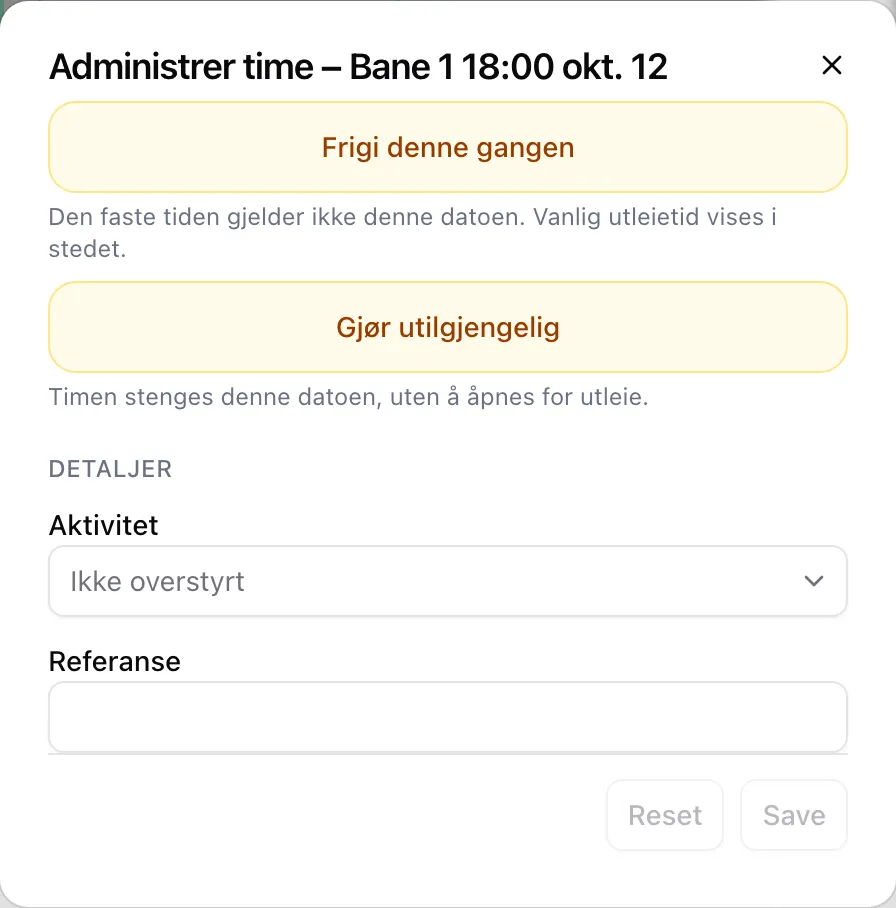
Both are undone with Restore fixed slot.
Step by step is in the admin guide for single slots, and what each button does in the admin reference.
Until now the facility has had no place of its own in Velpr for news: a new court, changed opening hours, a course that is starting. Now you can write blog posts straight in Velpr.
Turn the blog on with Active on blog under Site → Navigation. Customers then get a new page, Posts, in the menu, and you get Blog in the admin menu. There you tap New post, write a Title and tap Create draft. A post can have a Cover image and an Excerpt, and the text is written in the same editor as About us and Find us.
Preview shows the post the way customers will see it. Publish puts it out with today’s date, and Back to draft takes it down again. Customers only see published posts, with the newest at the top.
The blog is off for all facilities until you turn it on. Step by step is in the admin guide for pages and blog.
No payment and payment outside the system
Section titled “No payment and payment outside the system”Two settings with almost the same name have been mixed up. Now they each do their own thing:
| Setting | Means |
|---|---|
| No payment under Site → Modules | Customers can complete an order without paying, also when it costs money. |
| Allow payment outside the system under Payment | Who on the staff can complete with Paid outside the system, for example when the customer pays cash. |
Allow payment outside the system is now always shown under Payment, whichever payment modules are on. The choices are Supporter, Administrator, Owner and Nobody. “Everyone” has been removed because it never worked for customers. A facility that had chosen “Everyone” now gets Supporter.
Fixes and small things
Section titled “Fixes and small things”- Season pass applied to the whole facility: a club code used as a Season pass made all slots at the facility free, and a Slot discount gave a discount on all slots. Now both apply only to the slots within the code’s Time and place. A code without Time and place still applies to the whole facility.
- Expired club codes: a club code that had expired still unlocked slots reserved for the club. Now Valid from and Valid to are checked against the slot you book.
- Periodic cards for the right period: a Periodic card was always registered for the next period, also when the buyer chose the current one. Now the buyer gets the period they chose. A card for the next period can also be used to book slots in the next period.
- Cards: New card under Season and punch cards (formerly Punch cards) saved nothing, without saying so. Now it works. Editing a card a customer owns turned off Periodic. It no longer does. To now covers the whole last day. Price, Punches and Number of months must be valid numbers, and a punch card is now called a punch card in the payment text, not a period card.
- Invoices on Min side: when you registered a payment or made a credit note, the customer did not see it. Paid invoices showed as unpaid under Min side (My page), and the credit note never appeared. Now the customer’s page is updated at the same time.
- Invoices: the Overdue tab and Block new invoices when there are overdue ones now work, and the reminder no longer says “is overdue” before the due date. A new Deferred payment tab shows payment agreements, also under Min side. A credit note can cover part of the amount (Amount to credit), and turning on the Invoice module is enough to get started.
- Replies to email go to the facility: email from the facility is now sent with the facility’s name as the sender, from Velpr’s address. If the customer replies, the reply goes to Email under Site → Owner information. If that field is empty, the reply goes to the owner. Before, replies could end up somewhere else entirely.
- Change role: the Role list under Site → Roles showed “[object Object]”, so nobody could be made Supporter or Owner. Now it works again.
- Registration times on events: when registration opened and closed was calculated one to two hours too late. Now Norwegian time applies everywhere.
- Quota: the quota now counts all bookings that have not started yet, also in other months, plus what is in the cart. Some customers may therefore reach the limit sooner than before.
- Release: a ticket can only be released before the slot or the event starts. If the ticket was paid with a punch, the customer gets the punch back on the card.
- The confirmation disappeared: right after a booking, the confirmation, the text and the door code could disappear from the screen. That no longer happens.
- Free text in the cart: the text the customer wrote in Free text never made it onto the order. Now it is on the receipt, in the email and in the payment text.
- Events: ticket groups can now be reserved for groups with Only for the groups, and Save no longer resets the number of reserved places. A ticket group with 0 places now counts as full everywhere, not as unlimited. The unused Discounts field has been removed.
- Registration: Next stayed grey if you filled in a previous participant. Changing the dog’s name on a ticket could save the old name. The export of the participant list now copes with quotation marks in the answers.
- Light control: changes you had not saved disappeared when the controller checked in. A booking that runs past midnight now keeps the lights after midnight. Manual override lasts at most 24 hours and requires the zone to be Active. Create new key / script now revokes the old keys, so paste in the new script right away.
- Door codes: the code is shown until the slot has actually ended. The confirmation only promises a code by email when there is a code for the slot. Instructions (external) under Access is now only shown to those who have booked. You do not need to do anything.
- Supporters: a Supporter can now book locked and closed slots, register people outside the registration period and see the participant list. Price, activity and reference on a single slot are changed by an administrator or owner.
- Outbox: shows recipients, status and date, and you can search by recipient and by the start of the subject.
- Sales open / Sales close: “Ons” and “5D” are now read as “ons” and “5d”, and the field accepts all the formats Velpr understands, such as “2h” and “ons@18”. The Maximum days before sales open field has been removed. It had no effect.
- Time and place on rental slots: if you tapped Add right after typing in Time and place, the rental slot was saved without time and place.
- New facilities start closed: new facilities start with Booking is open off, so nobody books before the setup is finished.
- Screen readers: forms, login, text editing and the Close the facility switch now have the right names for screen readers.
- New documentation: almost all the admin pages have their own guides, among them payment, invoices, cards, club codes, users, notifications and content. Setting up a new facility has been rewritten as a checklist from start to finish.
Under the hood
Section titled “Under the hood”- Tighter access control: what each role can do is now decided in one place, and checked the same way in the app and on the server. This closes holes where an administrator or supporter could make themselves owner, and where a logged-in user could book a paid cart without paying. You do not need to do anything.
- Safer saving: more changes, such as blog posts and settings for Incidents, now go through the server, which checks who you are and what you are allowed to do.
- Invoices are saved together: the invoice number and both copies of the invoice are saved in one operation. An invoice can therefore no longer end up half saved.
- All scheduled jobs run in Europe, like the rest of Velpr.