
Rental
The rental page defines everything that can be rented, at what time and at what price.
Settings
Section titled “Settings”Close or open booking for customers, plus a few settings that do not quite fit anywhere else.
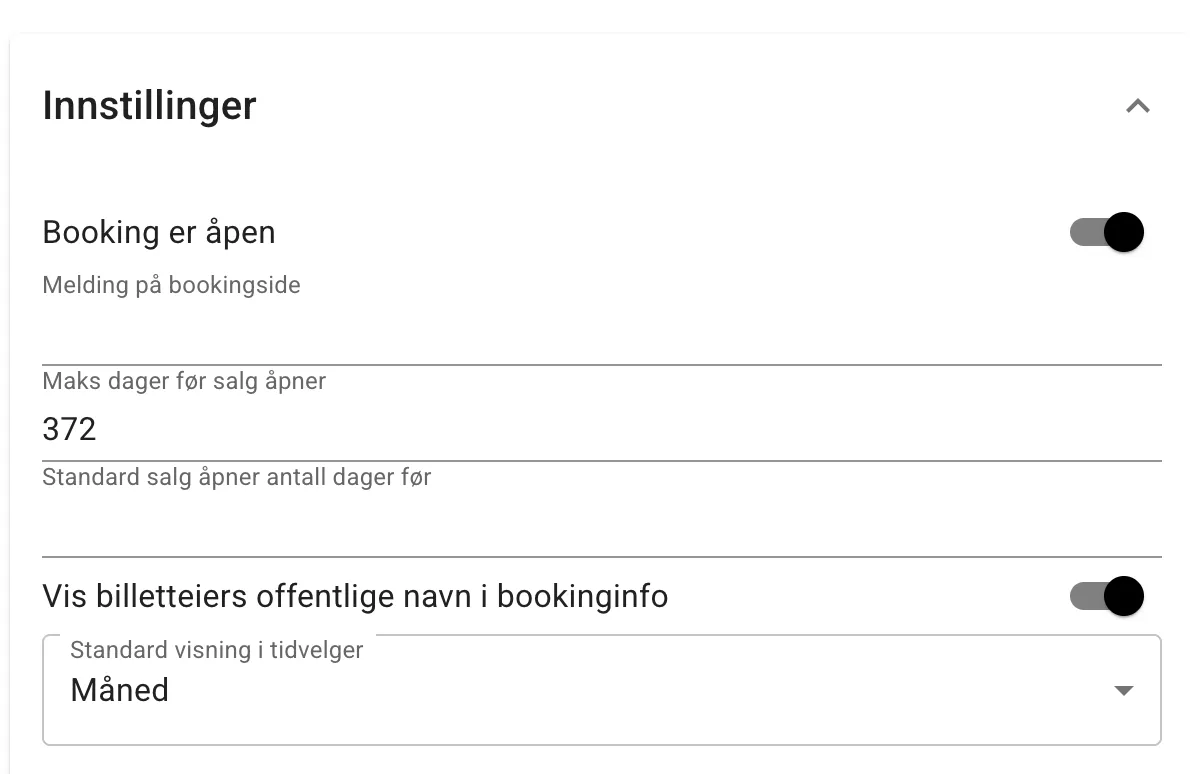
| Setting | Explanation |
|---|---|
| Booking is open | Off: customers see “Booking is down for maintenance. Please try again later.” and cannot book. Administrators and owners can still book. |
| Maximum days before sales open | Has no effect at present. |
| Default number of days before sales open | Unless something else is specified, this controls how far in advance something can be rented. |
| Show the ticket holder’s public name in booking info | If this is on, every ticket for a rental slot has a name. For group slots this makes it possible to see who is already coming to the slot. |
| Default slot picker view | The new slot picker has two views — day and month. Here you choose which one is shown by default. |
Rental slots
Section titled “Rental slots”What can be rented out, when and at what price is decided by this table. When the system decides whether a slot is available to rent, it starts at the top of the table and uses the first row that matches time, place and validity. The order of the rows is therefore important.
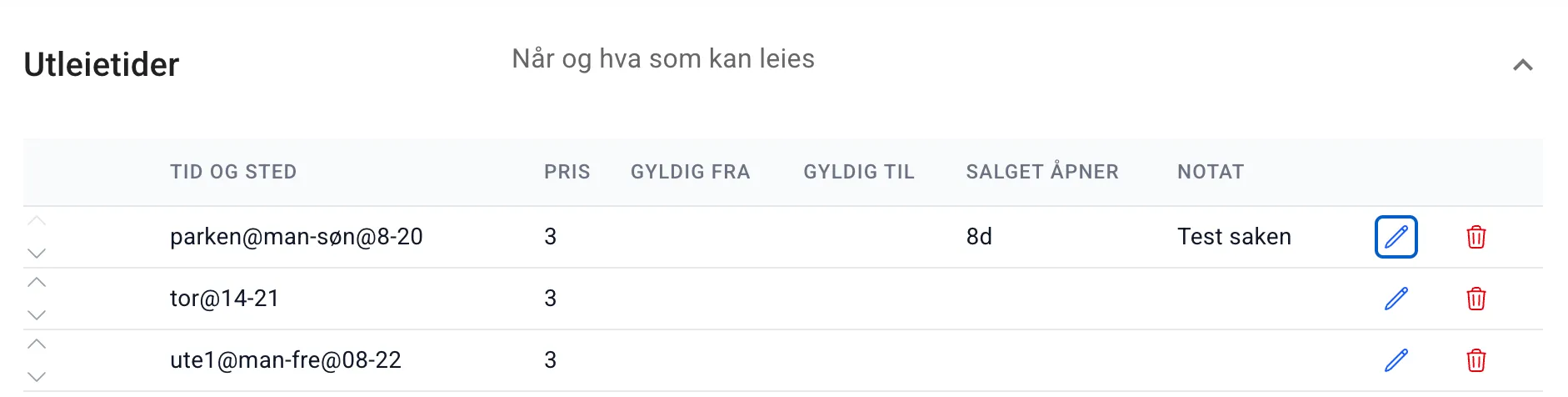
The table shows some of the most important columns, but this varies with the width of the screen. To see all the columns or change the row, press the button with the pencil icon. You will then see something like this:
Rental slots — editing
Section titled “Rental slots — editing”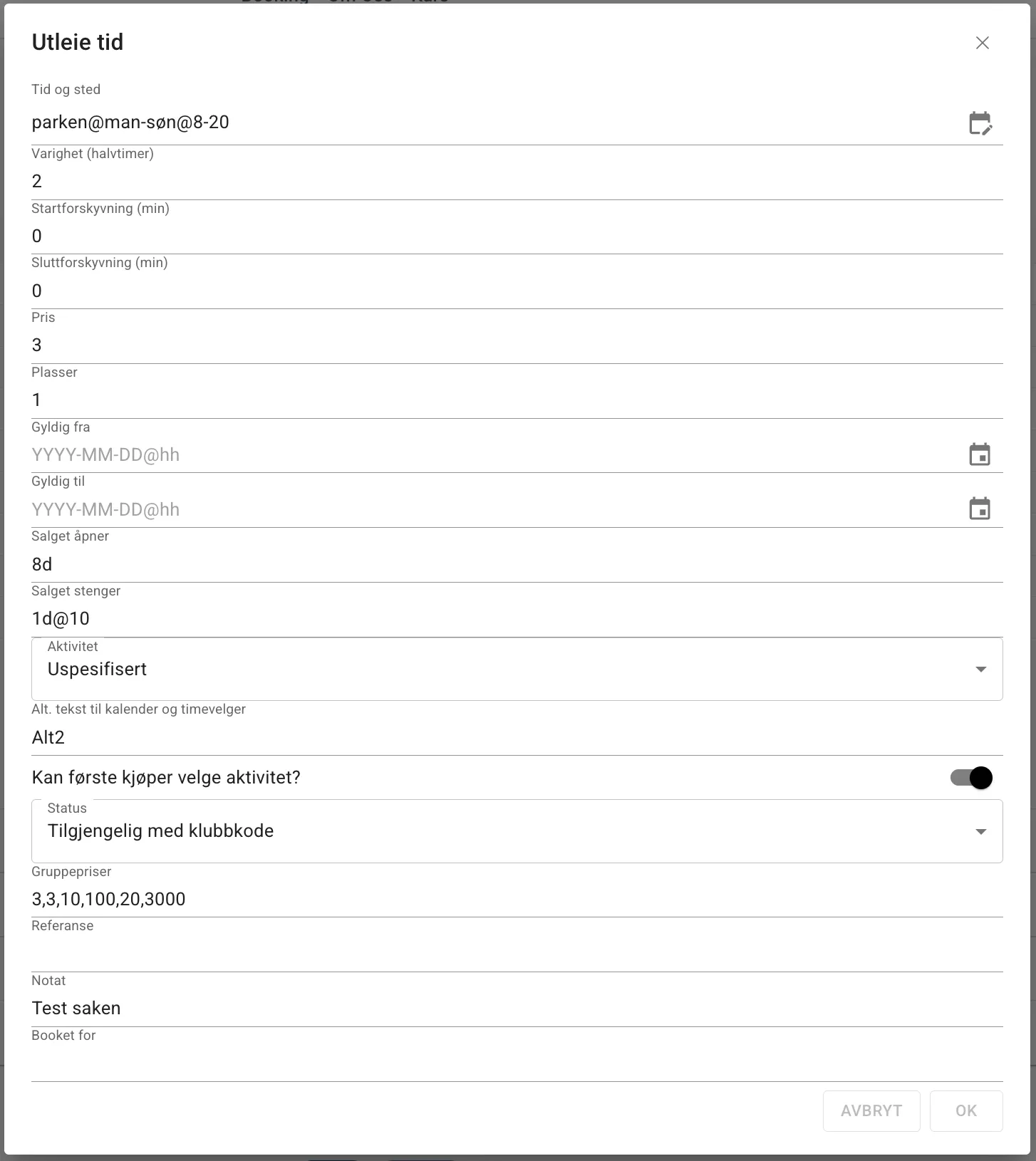
| Field | Explanation |
|---|---|
| Time and place | Defines which rental units, weekdays and times of day this row applies to. The format is unit@days@hours, e.g. parken@man-søn@8-20. Empty parts mean “default time”. See also time and place. |
| Duration (half hours) | How long each rental slot is, measured in half hours. The default is 2 (= 1 hour). Set it to 4 for 2-hour rentals, 6 for 3-hour rentals and so on. The system automatically splits the available time into blocks of this length. |
| Start offset (min) | Moves the start of the rental the given number of minutes into the half hour. E.g. with the value 5 on a slot starting at 09:00, the rental itself starts at 09:05. The value can be 0–29 minutes. |
| End offset (min) | Shortens the rental by the given number of minutes from the end. E.g. with the value 15 on a slot ending at 10:00, the rental itself ends at 09:45. The two offsets are independent of each other. The value can be 0–29 minutes. |
| Price | Price per ticket in whole kroner. |
| Seats | Number of tickets (seats) that can be sold for each slot. The default is 1. Set it to e.g. 2 if two independent customers can rent the same time. |
| Valid from | The row only applies to dates from and including this date. Format: YYYY-MM-DD, or YYYY-MM-DD@hh to give a time of day. Leave it empty to apply from the beginning. |
| Valid to | The row only applies to dates up to and including this date. Same format as Valid from. Leave it empty to apply with no end date. |
| Sales open | Controls when customers can start booking a given slot. Given as a relative time before the slot, e.g. 8d for 8 days. You can also specify a time of day: 1d@10 means sales open at 10:00 the day before. Overrides the setting “Default number of days before sales open”. |
| Sales close | Controls when sales close for a given slot, same format as Sales open. E.g. 1d@10 means sales close at 10:00 the day before the slot. |
| Activity | Choose which activity to link to this slot. Activities are defined in the Activities section further down. |
| Alternative text for calendar and slot picker | Replaces the activity name and status message in the slot picker with this text. Useful for giving a short description of what the slot is for. |
| Can the first buyer choose the activity? | When enabled, whoever books the first ticket for a slot can choose which activity the slot will have. |
| Status | Decides the default status of the slot. “Available” means open to everyone. “Available with a club code” means the customer must enter a club code in the cart to be able to book. |
| Restricted to groups | Empty means open to everyone. If you tick one or more groups, only their members can book the slots; others see them greyed out and unavailable. Under the section Access and status. |
| Alt. text when locked by group | The text people who are not in the group see instead of the activity. Empty means the group name. Members never see this text. |
| Discount for groups | Which groups get a discount on the slot. Shows the groups’ slugs. Hidden until at least one group exists. Under the section Discounts and extra prices. |
| Discount type / Discount value | Percentage or Fixed amount, and how much. Applies only to the groups above. |
| Optional prices (student, senior, …) | Which of the facility’s optional prices this row should offer. A checkbox list, hidden until at least one price has been defined under Facility. See optional prices. |
| Group prices | A surcharge by group size, as pairs of size and surcharge. 2,100,4,200 means: fewer than 2 gives no surcharge, 2–3 people + 100 kr, 4 or more + 200 kr — on top of Price. The customer chooses the group size in the info box. See group prices. |
| Reference | A public message shown in the info box for the slot. |
| Note | Free-text field for internal use. Not shown to customers, but the field is not encrypted and can be retrieved by the technically minded. |
| Booked for | Email address(es) of users who should receive notifications for this slot. Comma-separated list for several. |
Time and place editor
Section titled “Time and place editor”In addition to choosing the valid from and to dates, the Time and place field also has a graphical editor that lets you define valid times and places in a more visual way.
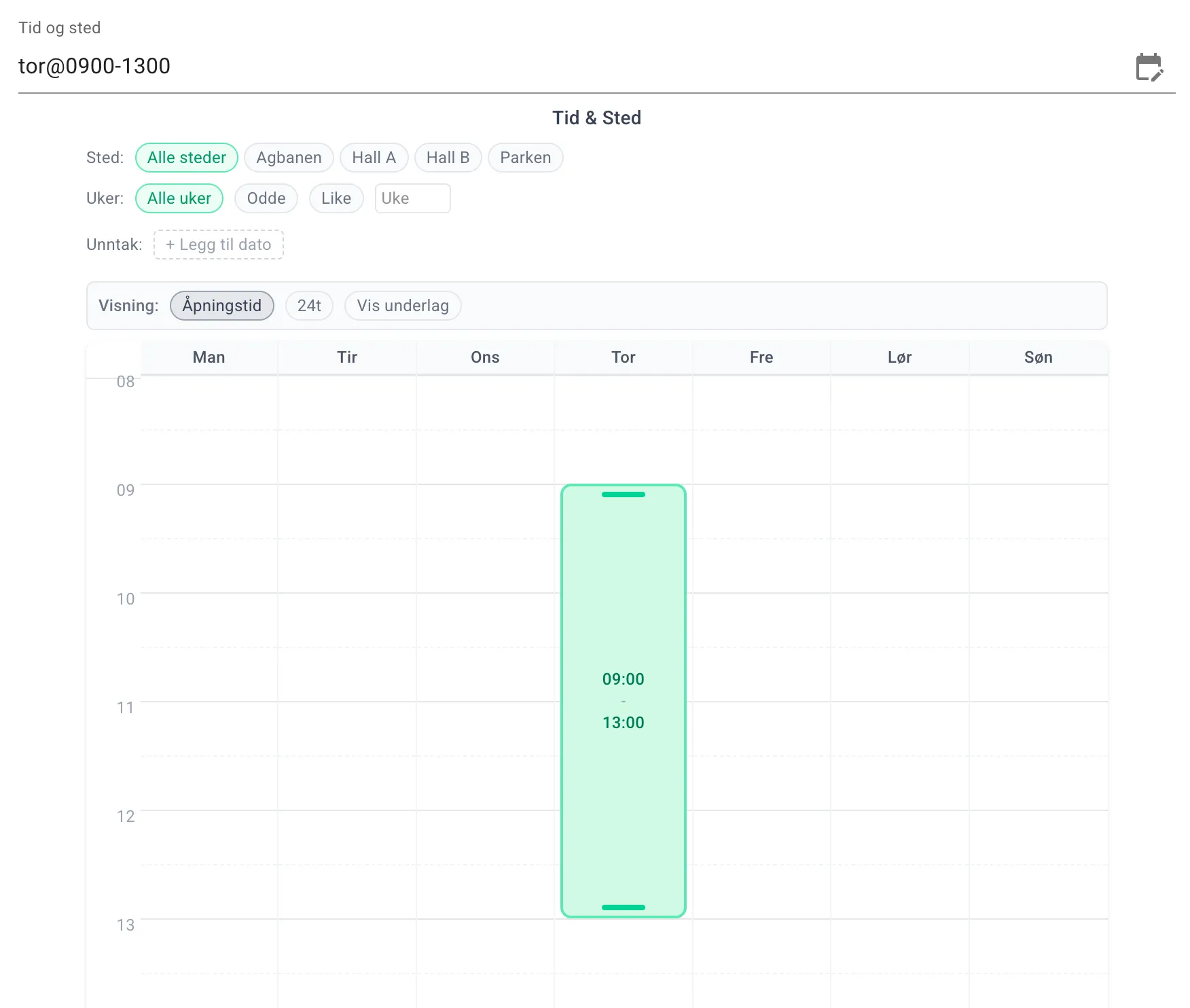
Here you can choose the place (rental unit), whether the time and place should only apply to some weeks within the validity period, set exception dates and choose which days and hours of the day this row should apply to.
To add time, click the calendar field and then adjust the green highlight so it covers the time from and including, to and including.
Read more in the documentation for time and place.
Fixed slots
Section titled “Fixed slots”Fixed slots are typically seasonal rentals, or exceptions to the rental slots. Here you can mark slots as booked or unavailable. The fields here are a selection of the fields for Rental slots above. A fixed slot always takes precedence over the rental slots for the same times. Duration (half hours), Start offset (min), End offset (min) and Alternative text for calendar and slot picker are also available here, and work as they do on the rental slots.
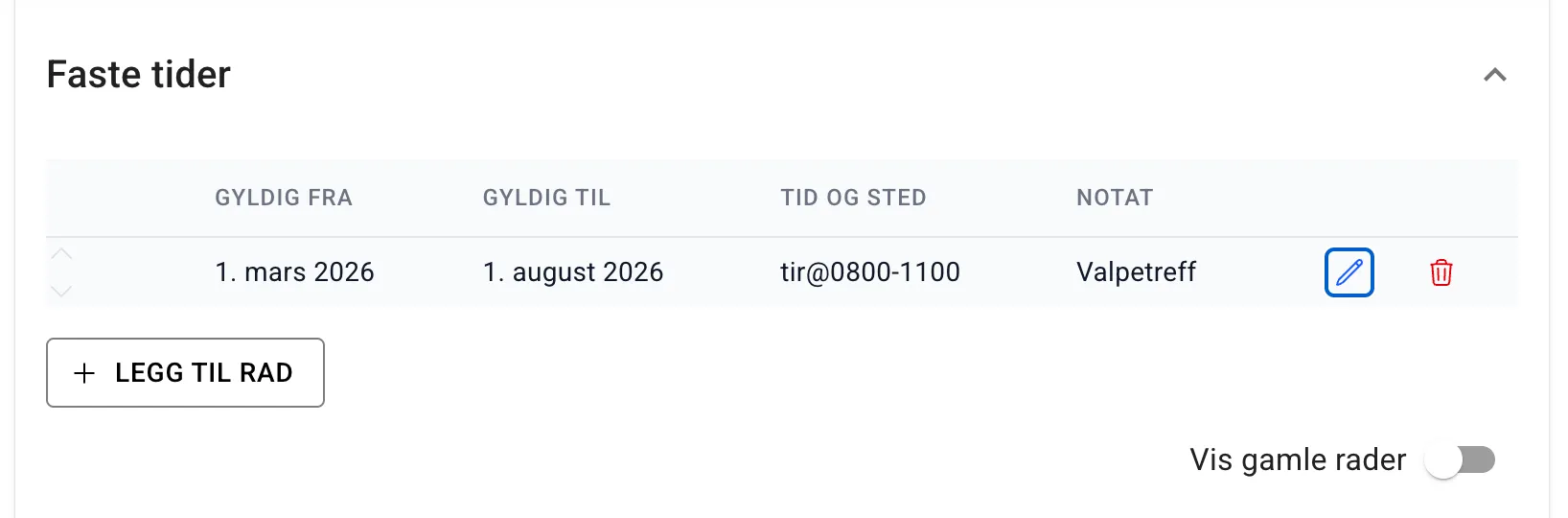
| Field | Explanation |
|---|---|
| Valid from | The row is only valid for dates later than or equal to this one |
| Valid to | The row is only valid for dates earlier than or equal to this one |
| Time and place | Gives the rental unit, weekdays and hours this row represents |
| Status | Whether the slots are booked or unavailable. New rows start as booked. |
| Note | Free-text field that is not shown to customers in the user interface. It is still not private |
Rental units
Section titled “Rental units”This is where you register the surfaces, parts, things or areas — that is, whatever can be rented out. For most people this is the one place they rent out, such as the hall, the outdoor court, the clubhouse or similar.
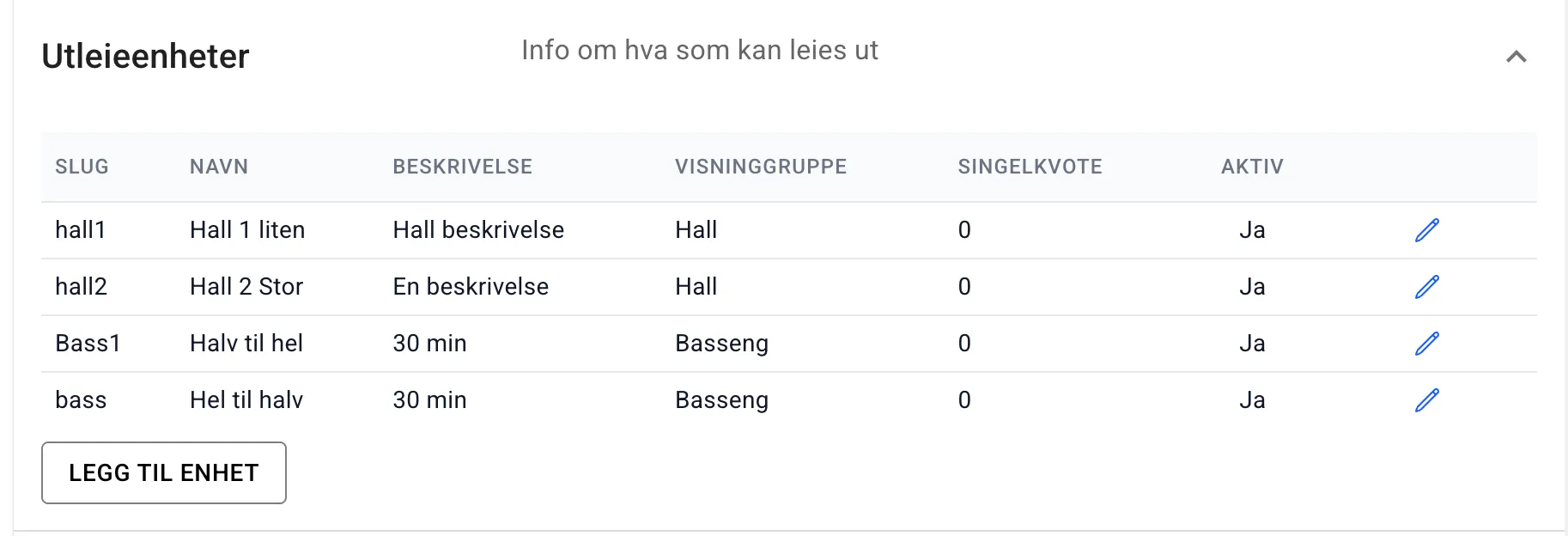
There are quite a few more fields available when you open each unit:
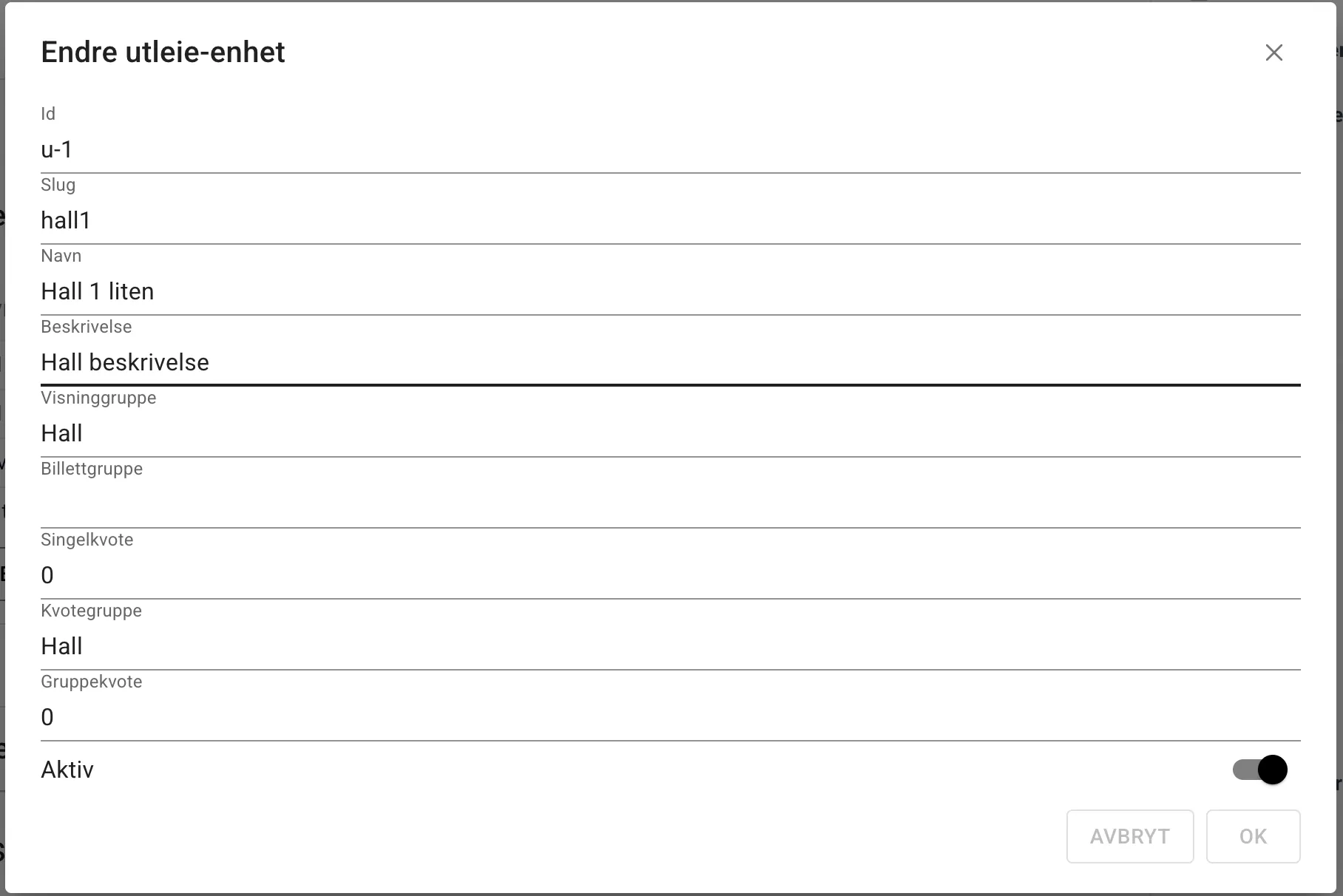
The two most important fields to fill in at first are the name and making sure the unit is active. The other fields are for more advanced settings.
| Field | Explanation |
|---|---|
| Id | An auto-generated id used in time and place expressions and wherever else the system needs to refer to a unit. It cannot be changed. |
| Slug | The slug is a unique but optional identifier for the unit. It can be used to refer to the unit in time and place expressions. |
| Name | The name used in the slot picker, in ticket names and on receipts |
| Order | The order the units are presented in the slot picker. Higher numbers further to the right. |
| Description | For now this description is only information for the facility owner. In practice it is not used |
| Display group | Units with the same display group are grouped together in the slot picker so that it is easier to get an overview. |
| Ticket group | Units with the same ticket group only issue one ticket for the same period across the units. E.g. you can rent out the whole hall and half the hall at the same time. If half the hall is booked, the whole hall cannot be booked at the same time. |
| Single quota | Here you can limit how many slots a customer can have outstanding. 0 means no limit. |
| Quota group | A name that ties several units together in one shared quota. |
| Group quota | How many slots a customer can have outstanding across all the units in the same quota group. See quota. |
| Active | If the unit is not active, it does not appear in the slot picker. |
| Restricted to groups | Empty means open to everyone. If you tick one or more groups, only their members can book slots on the unit. Others see the slots greyed out, as Group only. |
Activities
Section titled “Activities”Activities are linked to slots that are rented out. Here you can, for example, set up that the hall is fitted out with an agility or rally course. For operators who only rent out an empty surface, an activity named “Fri” (free) is added automatically.
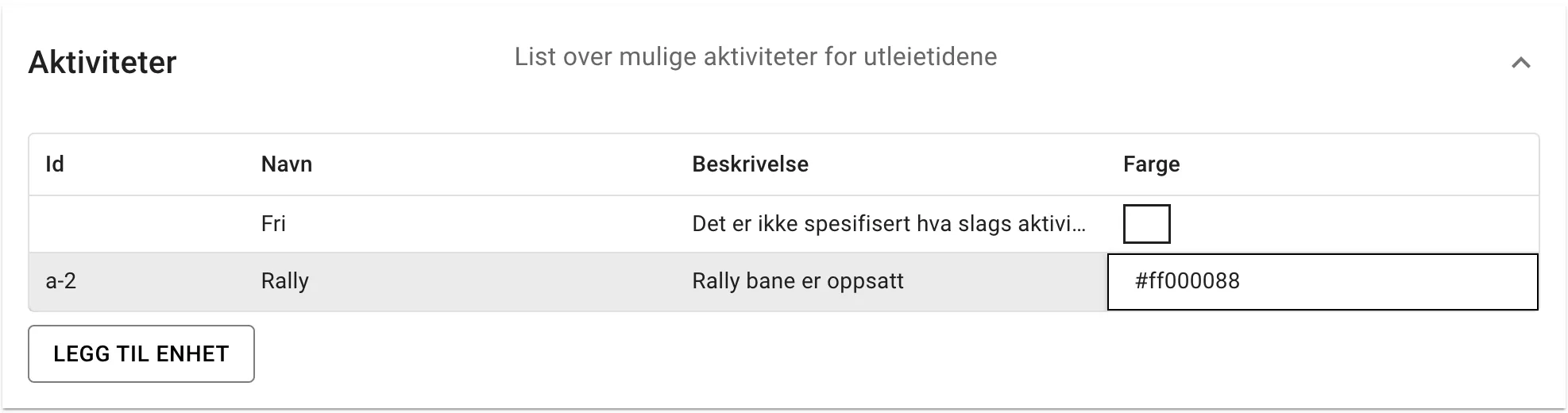
| Field | Explanation |
|---|---|
| Id | Auto-generated id the system uses internally. |
| Name | The name that is shown on the slot and in the slot picker. |
| Description | Only used in this table. |
| Ticket option | Whether users can choose the activity for slots where the first ticket chooses the activity. |
| Show in the slot picker | Should this activity be shown in the slot picker? For the default or an unspecified activity it may be just as well not to show anything. |
| Colour | Sets the background colour in the old slot picker — this is being phased out |
Default times
Section titled “Default times”Default times are at the bottom of the page, just above the preview.
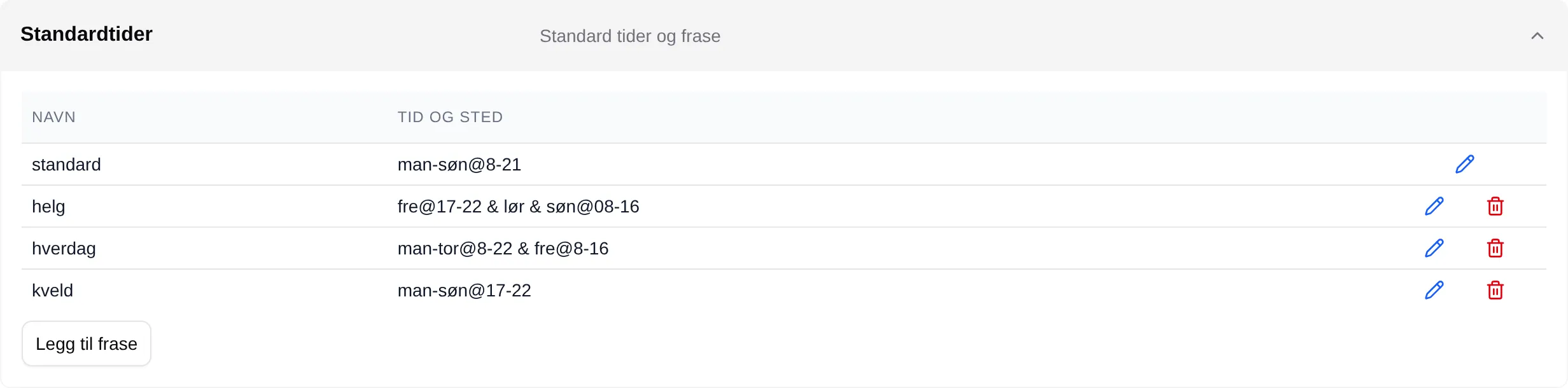
The first row, standard, is the facility’s opening hours. It cannot be
renamed or deleted. Velpr uses it to fill in days and hours that are missing in
a time and place expression, and to decide what time of day sales open and
close. Unchanged, it is man-søn@8-21.
The other rows are phrases: named expressions, for example helg
or kveld. If you write the name on its own in Time and place on a rental
slot, the expression is used instead. The name must stand alone — it cannot be
combined with anything else in the same expression.
| Field | Explanation |
|---|---|
| Name | The name of the phrase. standard cannot be changed. |
| Time and place | The expression. See time and place. |
| Add phrase | Adds a new phrase. |
Preview
Section titled “Preview”This is the slot picker, but based solely on the rental information and fixed slots as they are being changed. You can therefore check that you have thought it through correctly before you make it available to all users.