
Version 2026.08
Lighting control
Section titled “Lighting control”The big news this month is Lighting control: Velpr switches the lights on and off based on the bookings at the facility. No more lights burning all night because the last person out forgot the switch — and no more dark halls because someone turned up five minutes early.
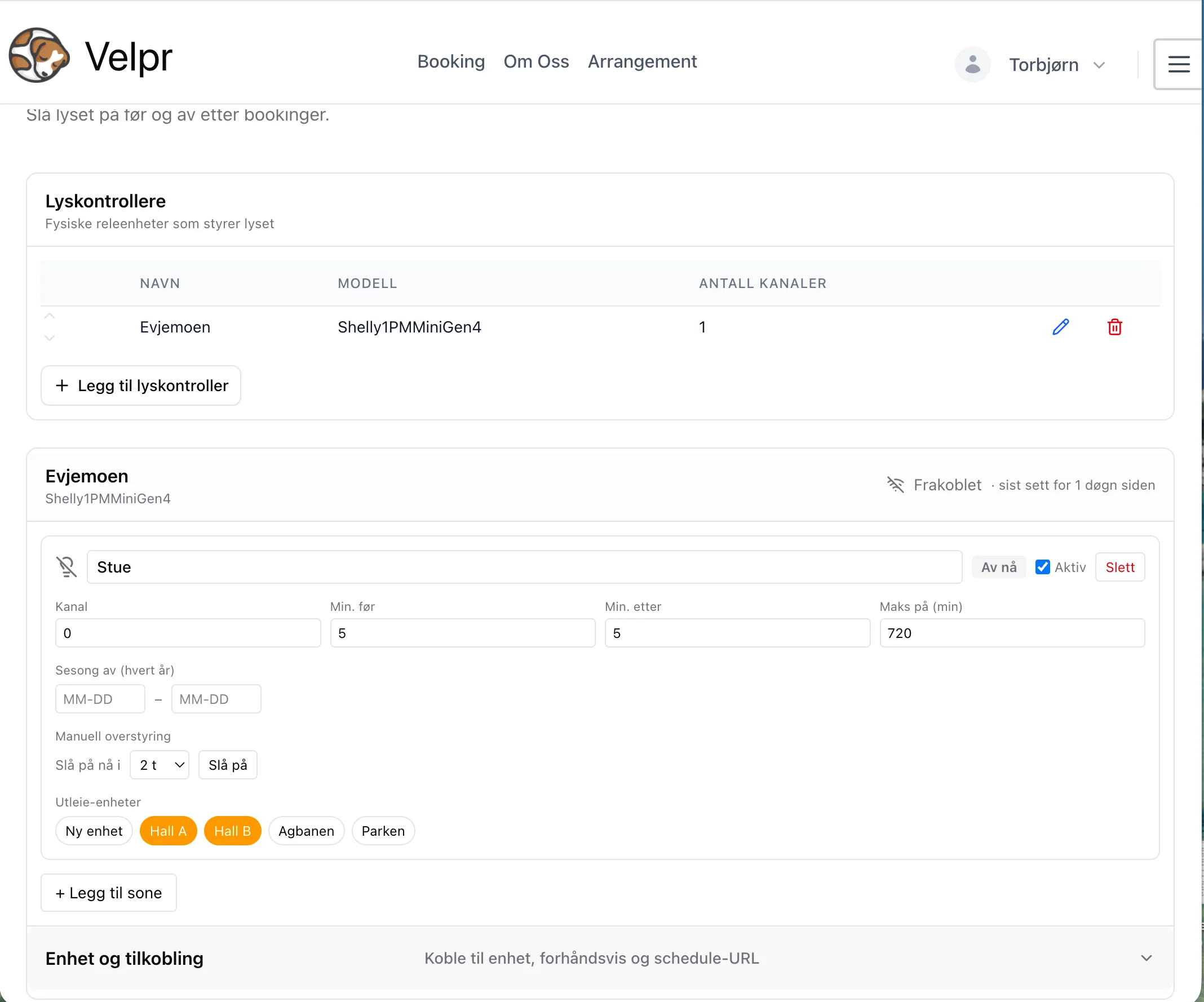
Turn the feature on under Admin → Facility → Modules. The Lights page then appears in the admin menu.
How it fits together
Section titled “How it fits together”The setup has three parts:
| Concept | What it is |
|---|---|
| Controller | The physical device in the fuse cabinet that switches the power to the lights. One controller has a number of channels. |
| Zone | One lighting circuit — one channel on the controller — together with the rental units that should light it. Timing and overrides live here. |
| Rental unit | The court or room the customer books. It is the bookings here that drive the lights. |
The rule is simple: a zone is lit if at least one of the linked rental units has an active booking. The relationship is many-to-many, so one lighting circuit may well cover two courts, and one court may light both its own court lights and a shared corridor circuit.
For each zone you choose how many minutes the lights should come on before the slot starts and stay on after it ends. Slots that run back to back are merged into one continuous lighting window, so the lights do not flicker off and on between sessions.
Manual override and season
Section titled “Manual override and season”- Manual override — force a zone on for up to 24 hours. Useful for testing the wiring, or for lighting up the hall during an event that is not in Velpr.
- Season off — an annual period in which booking-driven light is switched off, typically for outdoor courts that need no light in summer.
- Maximum on-time — a safety limit that prevents an odd booking from leaving the lights on indefinitely. In normal operation you never notice it.
- Preview next 48 h — shows exactly which lighting windows the device is going to run, so you can check the setup before any physical light is connected.
Robust when the network goes down
Section titled “Robust when the network goes down”The device pulls its schedule from Velpr around once a minute and runs the next 48 hours from its own memory. Velpr never dials out to the device. That means the lights keep switching correctly even if the internet or Velpr should be down for a while. If the outage lasts, the device turns everything off as a safe state.
Hardware
Section titled “Hardware”The first supported manufacturer is Shelly (Gen2 and newer). We recommend the Pro series — Shelly Pro 1, Pro 2 or Pro 3 — which has better current capacity and is more robust. The device is mounted on a DIN rail in the fuse cabinet by an electrician. We also recommend a hand–off–auto switch per circuit, so that staff can override locally whatever happens to the network or to Velpr.
The goal is to support all relay controllers that are relevant for lighting control — Shelly is just the first.
Two new guides cover this in detail: Lighting control for the configuration, and Installing a Shelly controller for the physical setup.
Vipps: back to square one
Section titled “Vipps: back to square one”Vipps has stopped offering the Checkout service and has gone back to their old solution.
The ePayment flow has therefore been brought back and updated to Vipps’ newest API. Existing facilities are unaffected — they stay on Vipps Checkout until they choose to switch.
Clearer quota information
Section titled “Clearer quota information”Quotas (how many slots a user may hold at a time) have been hard to relate to: you were only told that you had reached the limit, not how close you were or when it frees up again.
Velpr now shows:
- How much of the quota is used — “3 of 5 used” — in the slot details, also before you hit the limit
- When the quota frees up — once a slot is blocked, it states which booking has to be completed before you can book more
That makes planning far easier, and removes a good share of the “why can’t I book?” enquiries.
Events hide the slots they actually cover
Section titled “Events hide the slots they actually cover”An event previously only hid rental slots that started at the same time as the event. A slot from 16:00 to 17:00 was therefore left available even though there was an event from 16:30 to 17:00 on the same court. Now all slots that overlap the event are hidden, regardless of when they start.
At the same time, the time zone handling in the calendar calculation has been tightened up, so times are always interpreted in the facility’s own time zone.
Cart takes precedence over reserved in the slot picker
Section titled “Cart takes precedence over reserved in the slot picker”If a slot is in your own cart, it is now shown as in the cart even if it is simultaneously marked as reserved. Previously it could look taken to the very person who was in the middle of buying it.
Facility category
Section titled “Facility category”Under Admin → Facility the facility can now be tagged with a category — dog, padel or other. This is used to adapt wording and setup in the app, and makes it possible to give different types of facility a more precise experience going forward.