
Users and roles
The roles
Section titled “The roles”A role applies to one facility. If you have several facilities, you give the role on each of them. Everyone else with an account is an ordinary customer.
| Role | Can also |
|---|---|
| Supporter | Help customers from the slot picker and the events: book on behalf of others, see who has booked, release tickets, manage single slots. Does not see Administration. |
| Administrator | Everything above, and all the pages under Administration — including Payment and Modules. |
| Owner | Everything above, and give and take away roles under Site → Roles. |
What each role can do in each feature is described in that feature’s reference:
- Booking
- Events
- Payment — Paid outside the system and On behalf of
- Single slots
The roles table
Section titled “The roles table”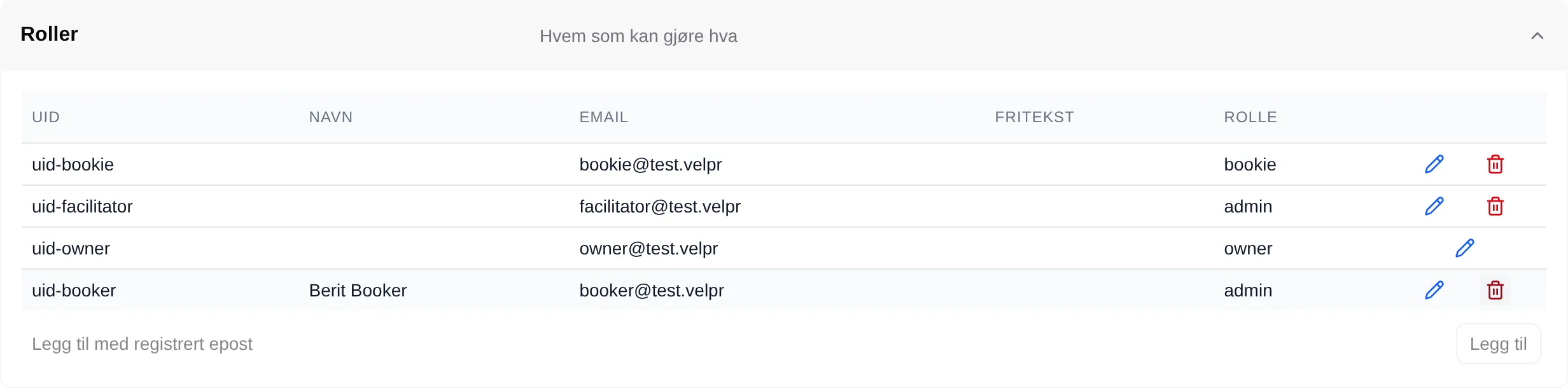
| Column | Explanation |
|---|---|
| Uid | The internal ID of the account. |
| Name | The name on the account. Can be empty. |
| The email the person signs in with. | |
| Free text | A note, for example “Café manager”. For information only. |
| Role | owner, admin or bookie — owner, administrator, supporter. |
- Only the Owner sees the pencil, the bin and Add. Administrators see the table without being able to change it.
- A new person becomes an Administrator.
- The person must have an account. If the email is not found, it says Fant ingen bruker med denne eposten (no user found with this email).
- An owner’s row cannot be deleted.
- The changes are only saved when you press Save at the bottom of Site.
The list under Users
Section titled “The list under Users”- The list shows the customers the facility has registered — usually those who have ordered something. Staff are not necessarily in the list.
- The figures cover the last two months, and only orders that have been completed.
- The figures are calculated from the last 1000 orders at the facility. On a busy facility they can therefore be too low.
There is no way to block a customer or limit what they can book.
Step by step: the admin guide for users and roles. The fields on the page: Users.